Sharing real-time chart snapshots with your Telegram or Discord community is a powerful way to communicate trade ideas, confirmations, and market context. With the TTA Alert Detector Chrome Extension, you can automatically capture TradingView chart screenshots and send them directly to your Telegram channels, Telegram groups, or Discord servers via webhook—without writing any code.
This guide explains, step by step, how to configure the extension and illustrates the workflow shown in the attached image.
What Is the TTA Alert Detector?
The TTA Alert Detector is a Chrome extension designed to monitor TradingView alerts in real time and forward them to any supported webhook endpoint. When the Attach Screenshot option is enabled, the extension captures the active TradingView chart and sends it together with the alert message.
This makes it ideal for:
- Telegram signal channels
- Discord trading communities
- Private trade journaling channels
- Educational trading groups
Step 1: Install the TTA Alert Detector Chrome Extension
- Open the Chrome Web Store.
- Search for Alert Detector TTA, or visit:
https://chromewebstore.google.com/search/Alert%20Detector%20TTA - Click Add to Chrome and complete the installation.
- Important: After installation, refresh the TradingView website to allow the extension to load correctly.
Step 2: Open TradingView and the TTA Alert Detector Panel
- Go to https://www.tradingview.com and open any chart.
- Load or create your TradingView alerts as usual.
- Open the TTA Alert Detector extension from your Chrome extensions menu.
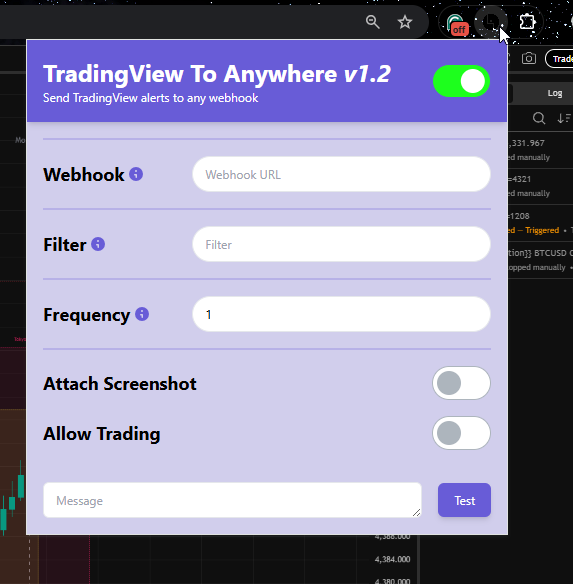
You should now see the extension interface similar to the one shown in the image below, with fields for Webhook, Filter, Frequency, and toggle options.
Step 3: Add Your Telegram or Discord Webhook
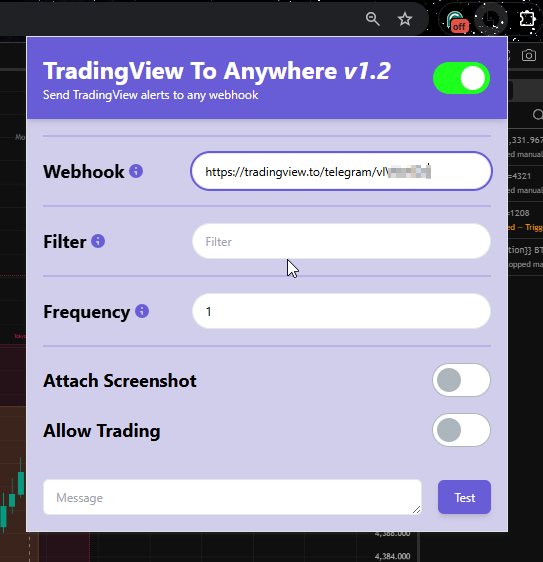
In the Webhook field, paste the webhook URL where your screenshots should be sent.
Examples:
- Telegram: A TradingView to Telegram webhook linked to a channel, private chat or a group
- Discord: A Discord webhook URL for a specific server channel
This webhook is the destination where both the alert message and the TradingView chart screenshot will be delivered.
Step 4: Enable “Attach Screenshot”
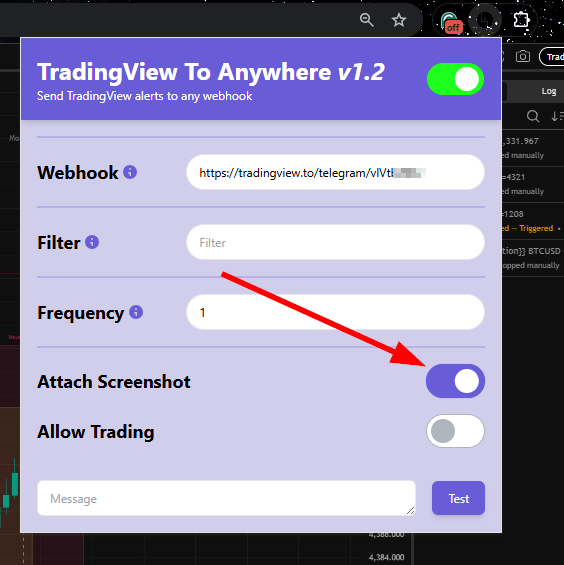
Toggle Attach Screenshot to ON, as shown in the image.
When enabled:
- The extension automatically captures the current TradingView chart.
- The screenshot is attached and sent together with the alert.
- Your Telegram or Discord audience sees exactly what is on your chart at the time of the alert.
This is especially useful for showing:
- Entry and exit levels
- Indicator confluence
- Market structure and price action
Step 5: Use Filter (Optional)
The Filter field is used when you have multiple TradingView alerts running simultaneously.
- Enter a keyword or phrase that matches the alert name or message.
- Only alerts matching the filter will trigger screenshot delivery.
- Leave it blank if you want all alerts to be captured.
This is useful for separating signals, confirmations, or different strategies.
Step 6: Configure Frequency (Optional)
The Frequency field controls how often the extension refreshes and checks for alerts.
- It represents the refresh rate of the extension.
- In most cases, it can be left blank or set to the default value.
- Adjust only if you are managing a high number of alerts and need tighter control.
Important Usage Requirement
For the TTA Alert Detector to work correctly, the following conditions must be met at all times:
- The TradingView website must remain open in your browser.
- Your computer must stay connected to the internet.
- Closing the TradingView tab or losing connectivity will stop screenshot delivery.
This is because the extension operates directly within the active TradingView session.
Once configured:
- A TradingView alert triggers
- The TTA Alert Detector captures the chart screenshot
- The screenshot and alert message are sent instantly to your Telegram or Discord channel via webhook
This setup provides a clean, automated way to share visual trading insights with your community in real time.
The TTA Alert Detector Chrome Extension offers a simple yet powerful solution for sending TradingView chart screenshots to Telegram and Discord. By combining TradingView alerts with webhook automation and screenshot capture, you can significantly enhance how you share and document market activity—without any technical complexity.
For traders, educators, and signal providers, this workflow ensures clarity, transparency, and professionalism in every alert you send.
Visit TradingView to Anywhere today to start automating!